Showing posts with label nexus. Show all posts
Showing posts with label nexus. Show all posts
Tuesday, 27 January 2015
Techwraps Australia Woodgrain Xbox One
Check out how incredible this is!!! www.techwraps.com.au
If you want to contact RDT please feel free to call between the hours of 9am-8pm AEST. deon@robertsondt.com Ph: 0426279566 or visit https://www.facebook.com/rdtaus

Wednesday, 15 October 2014
Don't Forget about the Nexus 9 and Player!!!!!

Google has really out done its self with design this time the Nexus 9 looks really amazing, very sleek and minimalistic. The best feature on the Nexus devices in the OS Android L, for a tablet this is perfect it get rid of all that useless bloat ware on other tablets.
Tech Specs are below:


This is something that will be very interesting to test out. The Nexus Player seems like a great companion for your TV and definitely something that will be useful.

If you want to contact RDT please feel free to call between the hours of 9am-8pm AEST. deon@robertsondt.com Ph: 0426279566 or visit https://www.facebook.com/rdtaus
Tuesday, 7 October 2014
Could this be our first look at the HTC Nexus 9?
After months of persistent rumors and just a few leaks, we’ve finally got our first image of the upcoming HTC made Nexus 9 tablet, which is expected to be officially announced later this month alongside a Motorola made Nexus 6 handset and the official launch of the Android L Operating System.
The leaked image was provided by @upleaks on Twitter, it shows off the back of the device with Nexus branding and a small HTC logo on the bottom. The tablet itself is very square compared to other Android offerings on the market.
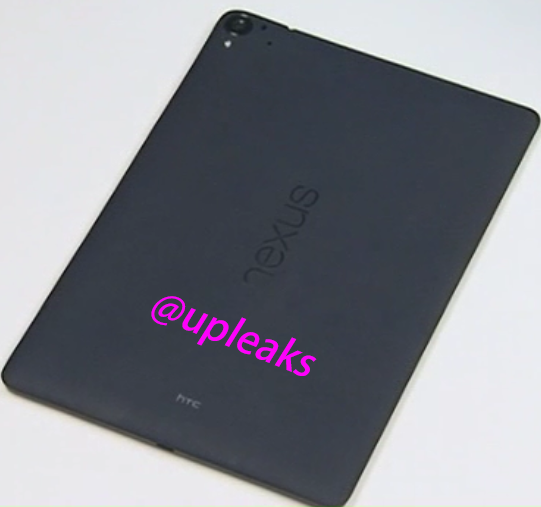
HTC’s upcoming Nexus 9 tablet has been codenamed the T1 throughout the creation process. On the top left we can see the rear camera alongside an LED flash, on the bottom we can see a standard micro USB port for charging and the back appears to made of a matte style, soft touch plastic.
As far as specifications go, previous leaks have suggested that the Nexus 9 will feature Nvidia’s Tegra K1 processor, either 3GB or 4GB of RAM and an 8.9 Inch 2560×1600 display.
Source: http://www.kitguru.net/laptops/tablet-pc/matthew-wilson/could-this-be-our-first-look-at-the-htc-nexus-9/
If you want to contact RDT please feel free to call between the hours of 9am-8pm AEST. deon@robertsondt.com Ph: 0426279566 or visit https://www.facebook.com/rdtaus
Tuesday, 9 September 2014
How The iPhone 6 Stacks Up Against Its Toughest Competition
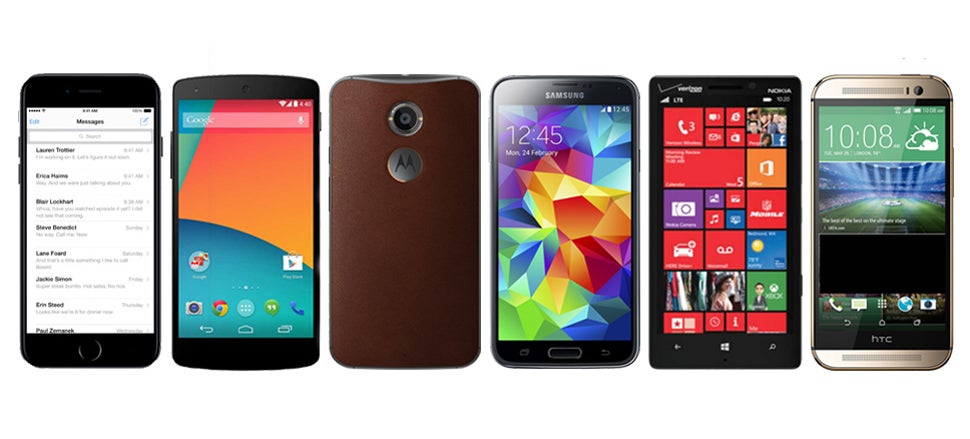
The iPhone 6 is here! It’s sleek and rounded, just like the leaked photos we’ve been seeing for months. But now we finally know what’s inside that Jony Ive-designed shell. How’s it measure up to the stiff smartphone competition? Let’s see.


First things first, screen size. Apple boosted the iPhone’s screen to 4.7 inches diagonal, up from just four inches on the iPhone 5. That’s still smaller than the competition, most of which has passed the 5-inch mark. But then again Apple’s also introduced a 5.5-inch jumbophone, the iPhone 6 Plus, to perhaps satisfy the lust for bigger screens.
It’s worth noting that the regular-size iPhone 6′s Retina HD display only musters 1334 x 750 resolution and 326 ppi, while every other phone in this chart hits the full 1920 x 1080 and greater than 420 ppi. Given how Retina works, that’s perhaps an apples-to-oranges (hah!) comparison. Smartphone displays have gotten pretty amazing across the board, but if you’re looking for the biggest HD screen in a “normal” size phone, nobody can beat the new Moto X and its 5.2 incher right now.
On storage too, Apple is going for the (much) bigger is (much) better mantra: The company has done away with the mid-range 32GB iPhone, opting for 16GB, 64GB or a gargantuan 128GB of built-in storage. The new-for-2014 HTC One M8 and Samsung Galaxy S5 can both stretch to 128GB, but they require a MicroSD card to get there. It’s up to you, I suppose, to decide whether removable storage is a blessing or a burden.
Apple gave the iPhone a big boost with two new powerful chips: The A8 dual-core processor gets 13 per cent smaller, 25 per cent faster, and a full 50 per cent more energy efficient compared to last generation’s A7. That last number is particularly important, since the regular-size iPhone 6′s battery, on paper, is pretty puny compared to the 2800mAh reactor in the Galaxy S5. It’s worth pointing out that, while the A8′s 1.4GHz and 1GB of RAM look pitiful compared to the Moto X and Galaxy S5, Apple’s chip is optimised in-house, giving Apple the chance to take full advantage of that revved-up new processor.
Then there’s the M8 fitness tracking chip, which can track your activity when you’re running, walking, cycling, or climbing stairs — the built-in barometer senses elevation changes. More on the M8′s capabilities here.
And while the new “smaller” iPhone is still considerably taller than last year’s model, compared to the competition from the Android and Windows Phone camps it’s still positively svelte. If you’re looking for a phone that won’t burden your pockets, the iPhone 6 has the lowest profile of all the flagship smartphones (Nokia’s Lumia Icon is ever so slightly shorter, but wider and thicker). The newest iPhone is way thinner andway lighter than the competition.
Other than that, small details abound. Apple has finally blessed the iPhone with NFC, as part of a pretty comprehensive plan to make your cash and credit cards obsolete. Apple’s quite late to the NFC game here, but maybe Apple Pay can give the fledgling tap-to-pay tech the boost it needs to gain widespread acceptance?
We know numbers don’t tell the whole story; iOS 8′s significant new features will have as much to do with the user experience as the guts inside that taller, trimmer new shell. But everyone has their own requirements for what’s most important in a smartphone. Compared to the competition, how do you think the iPhone 6 stacks up? Tell us in the comments below.
If you want to contact RDT please feel free to call between the hours of 9am-8pm AEST. deon@robertsondt.com Ph: 0426279566 or visit https://www.facebook.com/rdtaus
Sunday, 6 July 2014
Nexus 9 Leaks
We are seeing a fair few leaks of the upcoming Nexus 9 at the moment, right now HTC is supposedly making Google’s next tablet and it is set to feature some pretty powerful components.
The latest information comes from evleaks, who claims that the early renders of the device were fake. The tablet will feature a solid aluminium body and “boom sound” front facing speakers, capitalising on the HTC One’s design success.
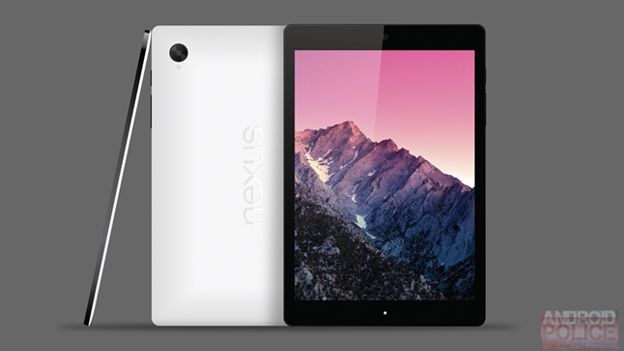
This render is apparently fake.
In addition to the aluminium body, the tablet is being tested with as much as 5GB of RAM but it could still ship with less. Nvidia’s Tegra K1 is also set to appear although the tablet has been tested with the Snapdragon 810.
One of the advantages of a 64 bit processor is the ability to take advantage of more than 4GB of RAM so it’s possible that HTC might want to make the most of it by adding in 5GB.
The screen will measure in at 8.9 inches with a 2560×1600 resolution, although it is being tested with 1680×1050
If you want to contact RDT please feel free to call between the hours of 9am-8pm AEST. deon@robertsondt.com Ph: 0426279566
Tuesday, 1 July 2014
Android L vs iOS 8
Android L and iOS 8 are set to see a fall release this year bringing up the regular Google vs Apple battle. This year is specifically more heated as Google has shifted its design focus to an entirely new era with Material Design. On the other hand, Apple made this shift last year with introducing minimal, flatter design philosophy for iOS 7. Apple is expected to make its iOS 8, thus, more features-rich than design-focused. The two new versions of rival tech giants do deserve a side by side, Android L vs iOS 8 comparison based on whatever we know so far.

This post is no way trying to take side of on mobile OS over the other considering the definite differentiating points of the both OS. However, you are free to stay on whatever territory you are as we are all well aware of how a mobile consumer is supposed to be either a crazy Apple fan or a maniac FAndroider.
Android L vs iOS 8:
One thing that was apparent in Google I/O this year was a focus on Material Design, introduced at the conference itself. From Android Wear to Android L, Google is gearing towards a complete ecosystem design shift. Offering consistency across Android, Chrome OS, Desktop, Chrome browser, and the Android Wear, Google aims to offer a user interface that is aesthetically clean and uncluttered.
Deja vu? Yes, Apple also shifted to a minimalistic look with its last year’s iOS 7. Be it a user feedback based change or that the cleaner look seems to be in fashion, the UI offered by both the tech leaders is based on the same basic principle: simplicity.
We will experience the Android L more when it is released, but from what we can see now it is packed with contrasting colors, bold images, new typography, and added layers to the entire design language. On the other hand, iOS 8 will retain the looks of iOS 7 fixing and improving a little here and there based on the past year’s experience.

Android L vs iOS 8 lock and home screens:
Android L has an increased focus on Notifications with an aim to give user a seamless interaction with the device using notifications. As opposed to earlier, Android L features the notifications right in the middle of the screen (much like iOS 7). You now don’t have to pull down the notification panel to read them. Swipe to dismiss it and tap twice to launch the particular app.
While iOS devices light up for a few seconds to help the user read the notifications at a glance, Android L doesn’t follow that route. When a notification arrives on Android L, the RGB notification light will go off to help user get notification.

Another thing that would be appreciated on iOS 8 is the added options: swiping can let you reply to an email increasing the ease for users. Both Android L and the iOS 8 lock screens have a short cut of camera – I totally appreciate the existence of that one! But the Android L lacks a shortcut to the phone app to dial a number as easily as possible.
Android L home screen is pretty much same to what we see in the Android 4.4 KitKat featuring the Google Now, folders, widgets, etc. iOS 8 is also keeping the home screen same to iOS 7 as it isn’t going into major design change.
One interesting development in both operating system is the third party widgets. While Apple finally is open to third party widgets in the notification panel, Google has stopped supporting the lock screen widgets, perhaps to make the lock screen uncluttered. Many comment that Apple opening its arms to third party widgets is due to users loving Google’s, it is yet to be seen how Android L’s lack of widget-support is taken by the end user. For one, it would definitely help in cleaning up the entire lock screen look.
Android L vs iOS 8 notifications and quick controls:
Android L significantly improves the notification panel by sorting the notifications with their priority order so important alerts get pushed up to the top. iOS 8 on the other hand classifies notifications under the tabs of different applications. The order of how these apps appear in the panel can be changed from Settings though.

Coming to the Quick Controls menu, iOS 7 made our lives easy giving us the ability to access quick control menu from any screen whatsoever. Filled with all the basic quick controls including brightness, WiFi toggle, music playback, Bluetooth, Camera, etc, iOS 8 will keep the Quick Controls as it. Android L is introducing a redesigned Quick Controls menu that is now accessible from the pull-down panel like before. The Android L Quick Controls menu now is stuffed with some basic controls that were lacking earlier including brightness slider and screen orientation lock.
Multitasking:
Moving away from the column of recent apps, Android L now features a redesigned interface for apps in the shape of a stack of cards, yep! While this is better looking and intuitive, the screen only shows 3 cards at a time requiring you to scroll down.
iOS 8 will better the current multitasking scenario by listing the apps in a chronological order with their icons on a separate row. iOS 8 multitasking menu will also feature a very helpful list of the most frequently contacted contacts to help user perform the basic contact functions quickly.
Android L vs iOS 8 photo galleries:
iOS 8 Photo app works as the gallery and editing platform for the OS. You can sort the images by time and date and back up easily to the cloud for storage. iOS 8 also packs quite a few editing skins for photos that though aren’t as extensive, perform the basics quite cleanly. 

Android L photos are also viewed in the Photos app where they are stored in two different tabs: one that stores all the images and another titled Hightlights carrying a few images organizing them by date. Like iOS 8, Android L too offers automatic back up to cloud and offers editing tools. Unlike iOs 8, Android L’s editing tools are quite varied and extensive packed with image filters, frames, basic functions, and effects. Very easy to play with to get some good results on your image.
Voice for Search:
 Google has started offering its voice commands for search with OK, Google command. OK Google works seamlessly from any home screen and with a recent update for Search app, the command can be used from any screen including the Lock screen. iOS 8 too has an equivalent of OK, Google with its Hey, Siri voice command for search function. However, iOS 8 only works with the aforementioned command when the device is plugged into a power source, which is pretty useless.
The battle of being the best:
All in all, both the Android L and the iOS 8 look promising in their beta versions. However, this year Google’s Android L will definitely get more attention due its complete design overhaul and introduction of having a consistent design philosophy through out the company’s services. With a visual treat and added layers in to the design, Android L is definitely going to win the hearts of its fans.
iOS 8, on the other hand, may not be introducing a visual redesign, but it doesn’t need one considering only last year it got a complete revamp. Apple’s opening to third party widgets will remain a highlight which opens the iOS devices to a pretty vast array of services and features that will keep us engaged with the OS’s interesting proceedings.
iOS 8 is expected to be released with the iPhone 6, probably in September; Android L is expected to be a little late with a pre-Christmas release on a new Nexus. Let us know what is your favorite feature of Android L and iOS 8 and which feature would you prefer getting some focus?
Please Check out WccfTech for some awesome news
Source: http://wccftech.com/android-l-vs-ios-8/#ixzz36GZCj4tP
If you want to contact RDT please feel free to call between the hours of 9am-8pm AEST. deon@robertsondt.com Ph: 0426279566
Sunday, 29 June 2014
Install Android L on Nexus 5 & 7
Google brought the news of upcoming Android L this week at Google I/O conference 2014. Set to be publicly released in Fall, Google has released the latest mobile OS for developers so they could test it and create perfectly matching apps. Just kidding! Android L brings not only design changes keeping in line with Material Design but also brings 64-bit support and a shift to ART from Dalvik. Developers are certainly going to love testing it out. Here is how you too can install Android L Developer Preview on your Nexus 5 and Nexus 7 devices.

As always, WCCFTech will not be responsible if anything goes Android in your process of testing it out. It is a test version so be prepared.
How to install Android L developer preview:
Here are the steps to help you install Android L on your Nexus 5 and Nexus 7 devices. As for the usual prerequisites, keep the battery at a full charge (or 70% at least) and create a backup of your data.
Required files: dowload system images for Nexus 5 or Nexus 7 under the Install the L Preview System Image label on the webpage. Also download ADB / Fastboot for Windows OR for MAC and Windows USB Drivers.
- Extract the content of everything into a single folder and name it Android for the sake of cmd simplicity.
- On your Windows, open the CMD or a new Terminal on your Mac. Type:
- cd YOUR_COMPUTER_USERNAME/desktop/android
- Next, turn your Nexus device off and enter into bootloader mod: use Volume Up + Volume Down + Power combo for Nexus 5; use Volume Down + Power keys for Nexus 7.
- Now connect your Nexus with the computer via USB cable.
- To make sure that your device is successfully connected, type:
- fastboot devices - for Windows
- ./fastboot devices - for Mac
- If not, try re-installing the driver or use a different port.
- To unlock your Nexus’bootloader:
- fastboot oem unlock and accept when prompted.
- Next, we will be flashing the Android L Developer Preview on our Nexus:
- flash-all.bat - for Windows
- ./flash-all.sh - for Mac
- Flashing process will now initiate which can a little while, so be patient.
Source: http://wccftech.com/install-android-l-on-nexus-devices/#ixzz365J2NsN3
If you want to contact RDT please feel free to call between the hours of 9am-8pm AEST. deon@robertsondt.com Ph: 0426279566
Saturday, 28 June 2014
Peek at Android L Features MKHB!
If you are like me and loving the New Android L which was revealed at Google I/O last week, you will love this video by MKHB perfect showcase of the new OS. All I need to do is install it on my Nexus 5. Another great thing is that HTC One M8 which has told the press that they will be releasing Android L within 90 Days of Googles final release.
If you want to contact RDT please feel free to call between the hours of 9am-8pm AEST. deon@robertsondt.com Ph: 0426279566
Thursday, 6 February 2014
Google's Nexus 5 in RED

Subscribe to:
Posts (Atom)